Pega allows you to import single wsdl file and but it is not possible when the definition is shared as list of linked XSD files. I have spent many ways such as placing the other files in to the service worker folder where the upload file goes before processing but nothing helped. Also checked the service provider where it is possible to host it somewhere and provide the URL as pega will properly import the service from URL. But it was not possible from provider.
In the end, I found a solution by placing the service definition on my own web server and referencing it through URL. While this may seem like an obvious solution, I am sharing this experience for anyone in a similar situation and exploring various options. To use the SOAP connector wizard, please upload the WSDL to a URL that Pega can access and provide the WSDL URL.
]]>Reusing Properties
Don’t get confused. I don’t mean reusing properties with the intended purpose they have created for instead reusing some irrelevant properties already available in the class for completely different purpose. Creating a new property rule doesn’t harm the performance of the system. Pega has got a good rule caching mechanism so only the used rules are counted. Even if there are many properties available in the class, if the name of the property does not match with the requirement feel free to create a new one. Stop using pyNote, pyLabel or pyDescription or any other property for the sake of avoid creating new property rules.
The code you create should be easily readable by one and it will save lot of time for yourself other team members in future. Don’t count on people’s knowledge for understanding which property hold what value at what situation in the application by reusing not relevant properties.
Naming the rules
I see in many applications developers name the rules to represent logic in it instead of the business purpose of the rule. For example consider a simple a requirement where if the amount is more than 100 you want to route the case for approval. So in this situation if you create a when rule “IsAmountLessThan100” you make an obvious mistake as naming the rule with the logic instead of the business purpose. In future if the business logic changes to where approval is needed for amount more than 150 instead of 100 then we are in trouble. Either the when rule IsAmountLessThan100 will hold a logic of Amount<100 or you will have to create a new when rule and change the places where ever you called the previous when rule. By doing this you loose the purpose of introducing the when rule in the first place which is keeping the logic in this single rule. So in this example situation the rule name could have been IsApprovalNeeded with the logic Amount>100. So when amount change you only update the amount in the when rule. Also the same time the application is more readable. In the flow if you use the when rule IsApprovalNeeded the path will go to approval. So reading the flow will become easy.
Using App Extension when not required
Using App Extension is a great way when developing frameworks to allow implementation applications to use the framework without copying rules from framework. But in a situation we build application for a particular client most of the details we don’t need to keep in the app extension. When we refer rules through app extension we sacrifices the referencing and trackability. If app extension is for sure going limit future customization then we could go for it. But most of the time we over do it.
Consider an example where we refer a work class through app extension saying the work class could change in future. Assume this is not a framework build, how frequently the class is going to be renamed. Also if the class is changed it is a code change going to happen within the same application. So the change cannot be addressed only by changing app extension. So it is not a good use case for app extension.
Consider another example where you refer a work basket / work queue name in the flow through an app extension thinking business might change the work basket name. Let say business wants to rename the work basket name, in this you should only update the work basket description as you should be displaying work basket name in screen not the ID. Let say business wants to split the work queue and for some scenarios wants to use a second work basket. In this scenario you will have to have change the flow even if you have used app extension as you will not have two references to the workbasket. So as you can see it is not going to add any value using app extension instead will make it difficult to see where the workbasket has been used.
So always question the decision whether you really need an app extension.
Focusing on guardrail score over anything else
In some of the projects I noticed, developers are too aggressive on reducing guardrail warnings and try different techniques to hide / reduce the warnings. Following are some techniques used to improve the score.
- Calling activities through functions in data transform.
- Creating a single activity by combining multiple actions in it and controlling the action to perform by parameters.
- Creating a single activity violates the best practice then calling it everywhere such as a commit activity.
We need to understand guardrail warnings will provide some inputs on best practices but following them as it is without proper insight will do more harm than help. For a certain scenarios if you need an activity you will have to go for it. If you need to call an activity in after action then create a post activity and call it from there instead of from data transform using function. When you call an activity inside a function you will not have the reference. Quality of your application is mostly depends on how readable and stable your code is than how much guardrail score you have.
Not using appropriate rule type
There are many rules types available in Pega. But most of the time we tend to use what ever we became familiar with. Time to time Pega introduces new features / rule types. Always be open for experimenting with new rule types instead of trying to achieve everything with known rule types.
For example let say you have queued something to run in background when user trigger it from the screen due to the heavy processing involved. How you will notify the user once the processing is complete? Are you going call refresh at time interval until it is done? That is when Pega UI channel notification comes where instead pulling you can use push notification through web socket implementation.
Not using appropriate technology
Pega is a very good BPM tool doesn’t make it a great whole purpose tool. So when solutioning a given problem always see if that needs to be solved within Pega. With the introduction of container based deployments it is easy to create and deploy micro services in any technology and connect them to Pega to solve the specific problem.
I will give an example based on a recent project I worked with where we were using Pega robotics. The problem was we have to connect to email server.
Over use of Job Scheduler
Job scheduler is good for doing batch processing of something at schedule time. But in some projects I see many thing is processed using queue processing including some part of the case processing. When job scheduler process a case and move from one stage to another the holistic view in case designer cannot give good understanding of the case processing. Always the design should be readable and should limit the possibility of introducing errors by new developers. For example in your project if you resolve all the cases at night using a job scheduler think whether you really need that. Instead you could add parallel flow when initiating the case which will resolve the case after no of hours based on a SLA rule at case level. This way load will be evenly distributed to the util nodes throughout the day instead of accumulating more loads at certain time. As more and more job scheduler added to the application to run at night you will start noticing performance decrease for the batch processing.
Having too many disconnected actions
In many projects, I have noticed developers tend to call several actions on click of button or link to achieve something. This introduce several issues. First one is performance issue and many sequential calls needs to be made to the server will have visible delay for users. Sometimes users will think click is not registered and could try clicking again. Although the Pega’s wait icon can be displayed to give visual feedback to users to let them know it is progressing the experience will not good for users. Second issue is many disconnected actions will make debugging difficult also there is no flow view on how things are moving. Always think if the sequence of actions can be organized in alternative stage and achieved using OOTB case processing. If there is no way using OOTB way, try to limit the number of actions by grouping things in single action call to server.
Summary
We have went through about some of the bad practices which we shouldn’t follow. Lets end this post with the quick checklist of what makes good design and implementation best practice.
- Use case stages and steps as much as possible.
- Avoid calling many actions on single click of button or link.
- Explore with many rule type available and find very appropriate rule type for the given problem.
- Avoid using job scheduler for part of the case processing, which should be handled within the case
- Avoid app extension when not needed. When something changes if you also have to change the rule then no point of referring it through app extension.
I know there will be many other points you want to add to this list. Write about the bad practice you noticed in comments below for others to know. Thank you for reading.
]]>- Running scheduled automation testing without mutating the actual data.
- Missing actual data for satisfying some scenarios where testing needs to be performed
- The actual service is not yet available, but the Pega implementation and testing needs to continue
- Needs to easily replicate a production bug for further analyze in lower environment by mimicking the data to match production scenario.
- Testing the applications for different behaviors when the data is not controlled by the organization something like weather data or stock market data.
- Testing exceptional / error scenarios
- Testing how the application reacts to performance issues from service. (By adding delays to the stub responses)
Mockware addresses all these issues by providing a modern React JS application combined with Wiremock helps anyone to easily create stubs for the integrations in Pega. Mockware contains three main components.
- React JS Front End Application
- Front end applications allows users to manage simulations against selected connector rules. Also provide the view of request / response audit served by simulation for helping debugging.
- Pega Component Application
- The Pega component application provide the REST service to manage the simulations settings from Pega side. The front end React JS application relay on this component to provide the connector meta data and enable / disable simulation on connectors when requested by the front end application
- Wiremock server
- Wiremock server is used as stub server which host and serves the simulations. The front end app will connect to this to manage simualtion and Pega will connect to this server when simulations enabled to server data from this stub server.
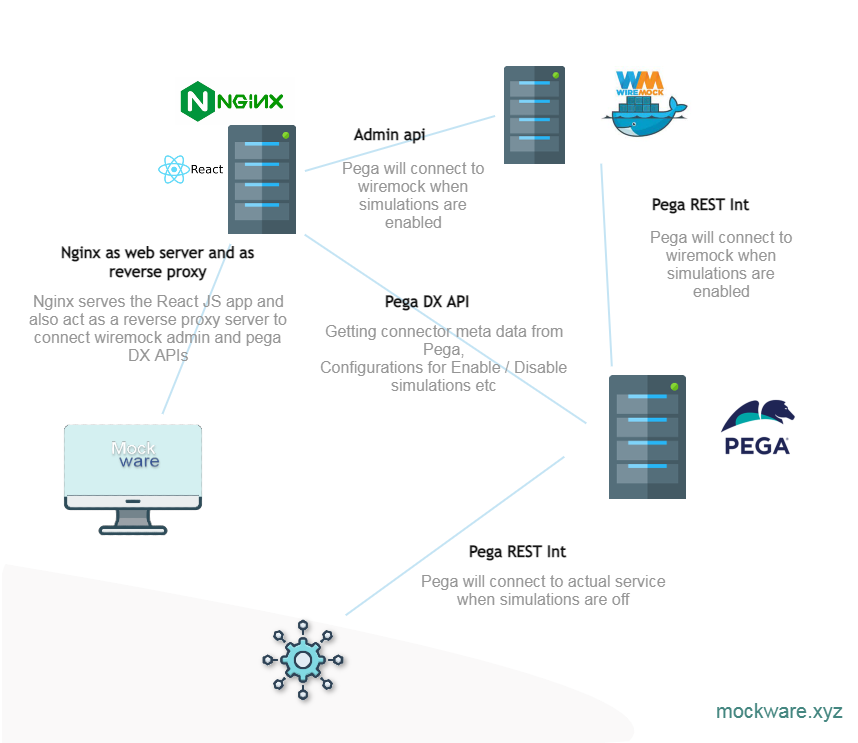
Using Mockware in your projects
You are free to use Mockware in your projects, if you are facing any issues with integrations in your project. You can comment if you want to know more about this.
]]>Most of the time column exposed is for reporting purpose when you query on multiple records. If you are opening a single instance using obj-open pega anyway going to fetch the data from the blob if blob column (pzPVStream) is available in the table. Also if you update a record in Pega and while saving if there is a new exposed column Pega is going to populate the column.
The column population job helps to handle the cases which are created before the column is exposed and the data is required for reporting purpose. Pega provides some db function which allows you to query directly from stream. The function can be used to populate the columns by running query instead of Pega column population job doing the job. This will be much faster as this doesn’t involve Pega. The query syntax will be something like this.
UPDATE <table name>
SET <column name> = pegadata.pr_read_from_stream('<column name>',pzInsKey,pzPVStream)
WHERE <condition>
You can use some condition based on create date time or other fields if you want to run the query in small batch. The function extract the column from the blob column and returns.
If you are populating the columns using query you can disable column population job to avoid performance impact caused by the column population job.
Tips: The same function also can be used to reports on unexposed column by running queries for one time requests. If the query needs to be executed frequently exposing the column is good idea. Also in report definition if you are referring a column it is a must to it needs to be exposed.
]]>You can resolve the issues by updating or creating a dynamic system setting with below details.
Purpose : json/escapeSpecialCharacters
Owning Ruleset : Pega-IntSvcs
Value : true
This will cause Pega to add escape characters to the generated JSON so the service provider will receive valid JSON input in the request.
]]>A small introduction if you don’t know pega or DX API. Pega is at the core is a BPM tool for managing work flows and it offers lot more than that. You can learn more at pega.com. DX API is set of REST APIs for accessing Pega’s case management functionalities for building front end in different technologies such as React JS or Angular JS.
The Problem
When using DX API with Pega you will have issues with maintaining the UI states as the DX API is stateless. So the changes you made to the case but not saved is not retained when you do a refresh, unless the data is posted back in each request. So many things works when using Pega natively will not work when using the functionalities through DX API.
An example scenario is setting some values in pre action if you use a data transform to set some values and displaying them in the screen. When loading the screen first time this will work as the UI meta data will be generated after executing the pre actions. But let say there is another on change action in the section where you do a section refresh. This time the values set in the pre action will be lost.
The solution
One way to overcome the issue is always call the pre action rules also in the on change action before performing the actual on-change action. But this will become problematic when you have many on-change actions and everything needs to be called when one thing got changed. So what is the solution?
Hidden fields to the rescue. In the screen add hidden fields to the values set in pre actions and in on change actions. When executing on change refresh action always post the values back (Don’t tick the disable on submit option on refresh) to the server. This way you can manage the UI state effectively without complicating UI actions by calling each actions all the time.
Hope this saved some of your time in your next task. You can ask me other Pega questions or suggest a Pega topic for my next post in the comments below. I am happy to address them. Connect with me on linked at https://www.linkedin.com/in/msnisha/
]]>