After close to two decades of building on Pega, I've noticed almost every integration-heavy project eventually produces the same sentence from a client: "we have a feed of records from another system — create a case for every one." It sounds like a single requirement. It isn't. It's several different integration shapes hiding behind one sentence, and which one you actually have changes almost every design decision downstream — capacity, failure handling, even whether you should be creating a full Pega case at all. This post is the reasoning I use to tell them apart, including the two approaches I tried and dropped on a recent project before landing on the right one.
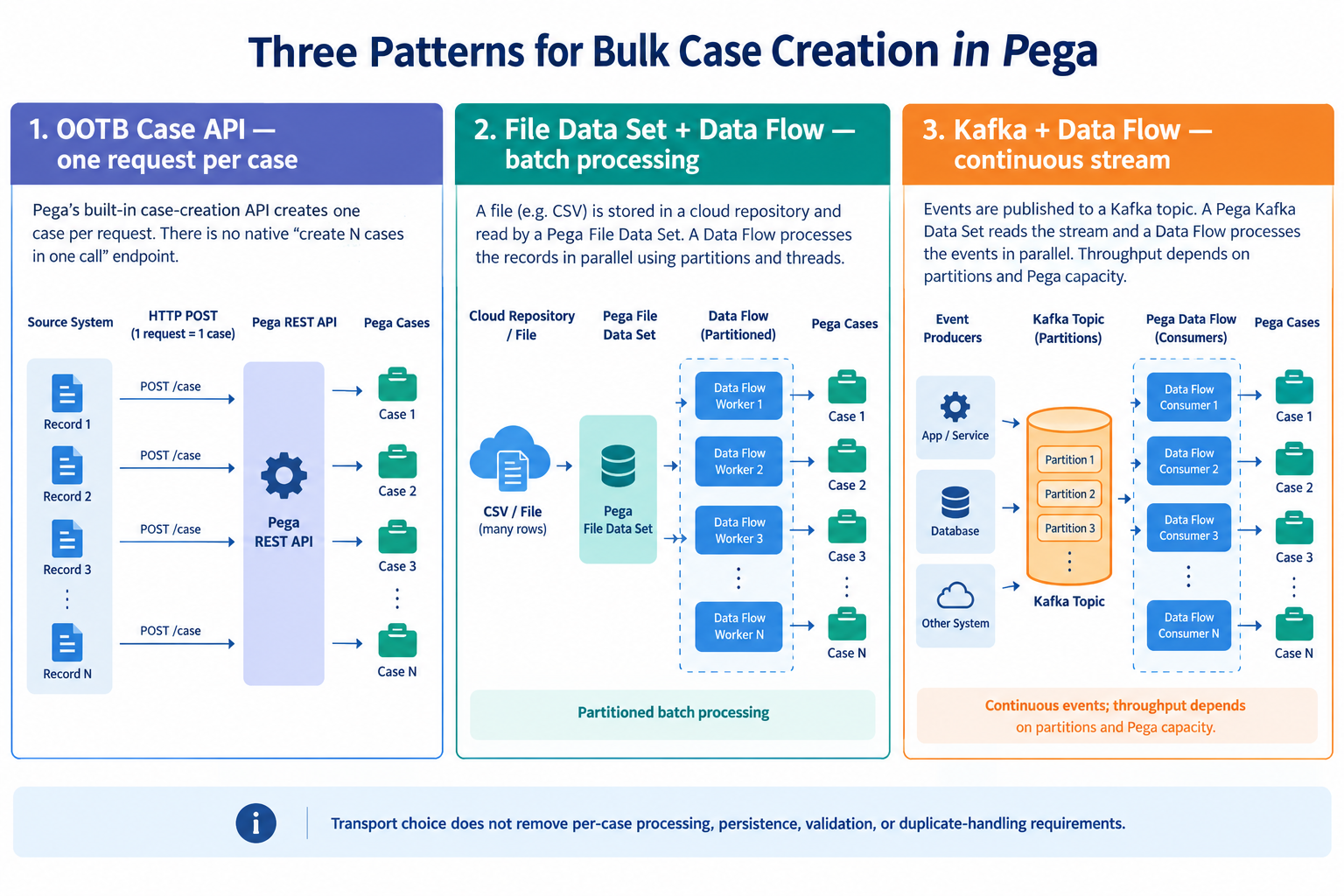
Whichever door the records come through, every case still has to be initialised, validated and written to the database. The transport changes how records reach that work and how you recover when it fails; it doesn't make the work disappear.
Bulk case creation is an architecture decision
The shapes I see most often are a file drop (a batch lands on disk or in a bucket on a schedule), a synchronous call (an external system wants a case created now and expects an ID back), and a continuous stream (events arrive indefinitely with no natural batch boundary). Pega has a way to handle each, but they are not interchangeable, and they differ in latency, ordering, failure recovery and operational cost far more than in anything you can read off a feature list.
Here is the summary table. Treat it as a set of starting points, not a performance ranking: the right choice depends on latency, volume, failure recovery, ordering, what the source can actually provide, and how mature your operations are.
| Pattern | Best fit | Main trade-off |
|---|---|---|
| File Listener | File-arrival-driven processing with manageable operational constraints | File lifecycle and processing limitations |
| File Data Set + Data Flow | Large batch files with a suitable source and a need for partitioned processing | Data Flow configuration, capacity and recovery |
| Repeated OOTB case API calls | Straightforward integrations that can manage individual requests | Request overhead, concurrency control and retry management |
| Custom asynchronous bulk API | A caller needs to submit a batch without waiting for every case to be created | Additional service, tracking and recovery design |
| Kafka + Data Flow | Continuous events, decoupled producers and consumers, scalable stream processing | Infrastructure and operational complexity |
What I tried and dropped first
This is what happened on one project; it is an account of my experience, not a controlled benchmark. The ask was "take this partner's daily claims file and create a case per row." My first instinct — because it was fastest to build and demo — was to have the orchestration layer read the file, loop over the rows and call a create-case REST resource once per row. It worked well in the demo with 50 rows. With a feed of about 40,000 rows it became a problem for us. I didn't capture proper timings, so I won't quote any, but what I concluded was that I had built a sequential loop with no real concurrency control, retry handling or way to see which rows had made it. The API wasn't doing anything wrong; I had picked the shape meant for "one case, right now, caller waits for the answer" and asked it to behave like a batch processor.
Second attempt: swap the loop for a File Listener pointed at the claims file. That is closer to a mechanism designed for "batch file, scheduled drop", but in our setup the partner's files landed in an S3-style bucket, and I could not point the File Listener at it directly. I was about to write a sidecar job just to copy the file to local disk first, purely to satisfy the listener — which is exactly the kind of extra moving part that suggests you're fighting the tool. (Whether a File Listener can read from a repository depends on your Pega version, so check the documentation for yours; this was the constraint in our environment.)
What I landed on was a Data Flow reading the file directly from the repository through a File Data Set, partitioned across nodes, with a case-creation destination. No sidecar download, parallel processing across the rows, and a trade-off I was able to live with: the Data Flow doesn't move or delete the source file afterwards. In our case that didn't matter, because the partner's bucket already expired old files under its own retention policy. For that workload and that environment, this was the right call. It isn't a claim that Data Flow beats a File Listener in general. The real lesson was that I had spent two iterations assuming a mechanism before writing down the feed's actual shape and constraints.
Option 1: the out-of-the-box case API
The standard Pega case-creation API creates one case per request; it does not expose a native bulk-create operation that creates multiple cases in one call (see the Case Management documentation and the Pega API specification). That does not mean APIs are unsuitable for bulk ingestion. It means there are three distinct patterns, and it's worth keeping them apart:
- Synchronous OOTB API. One request creates one case and returns a response. This is the right fit when the caller needs an immediate outcome or the case identifier.
- Repeated OOTB API calls. The integration sends one request per source record, ideally with controlled concurrency and retries. It's straightforward, but the standard API contract doesn't tell the client how to do rate control, error handling or reconciliation. That's all yours to build, and it's where my first attempt fell short.
- Custom asynchronous bulk-ingestion API. A separately designed service accepts a batch, returns an acceptance or tracking identifier, and a background process creates the individual cases. This can decouple the caller from the processing, but it needs its own design, monitoring and recovery mechanisms. It is not an out-of-the-box capability of the case-creation endpoint, and accepting a batch payload does not by itself make case creation faster — each case still has to be processed and persisted.
Diagram A: with the OOTB case API, each source record triggers its own request and produces one case.
Option 2: File Listener
A File Listener is a sensible choice when files arrive at a defined location, file arrival should trigger processing, the volume and processing constraints fit what the listener can do, and you understand the file lifecycle and error handling you need. Its strength is that the model is simple and well suited to "a file showed up, process it".
Where it gets awkward is everything around the file. Before committing, work out how you will handle:
- File pickup and duplicates — what stops the same file being processed twice, whether it's a re-delivery or a restart.
- Archive or quarantine — where a processed or rejected file ends up, and who is responsible for cleaning up.
- Malformed records — whether one bad row fails the file, or is isolated and reported.
- Partial failures and restart — what happens if the node dies at row 20,000, and whether you resume or start again without creating duplicates.
- Reprocessing — how you re-run a corrected file or a subset of it safely.
I would also be careful about assumptions around concurrency. The processing model of a File Listener is oriented around the file rather than around spreading rows across many threads or nodes, and that is the limitation I ran into. How much parallelism you can get depends on your Pega version and listener and node configuration, so verify it against the documentation for your release rather than assuming a deployment is globally single-threaded — or that it isn't. A File Listener and a File Data Set with a Data Flow are different mechanisms with different strengths, not two settings for the same feature, so don't treat one as a drop-in replacement for the other.
Option 3: File Data Set and Data Flow
A file-based Data Flow is worth considering when the feed contains many records, the source is supported by your version's File Data Set configuration (a repository such as a cloud bucket, rather than a local path), parallel processing would help, and the source repository can support the operational model you need. The Data Flow reads the file through the Data Set, can split the work into partitions, and runs it in parallel across threads and nodes, with case creation as the destination.
Diagram B: a file read through a File Data Set and processed by a partitioned Data Flow, with parallel workers creating individual cases.
I won't promise a throughput figure for this: it depends on your case-initialisation logic, the database, the number of partitions and threads, and the nodes you give it. What it did give me on that project was parallelism and no copy step. What you give up, depending on your version and source, is the file-handling conveniences around the file itself (moving, archiving), so check what your configuration supports and plan the lifecycle yourself — for example with a retention policy on the bucket, as we did. Malformed records, partial failure and restart need the same thought as with a listener: decide in advance whether a bad record fails the run or is set aside, and how a run is resumed or re-run without creating duplicates.
Option 4: Kafka and Data Flow
Kafka is a durable event-streaming platform that decouples producers from consumers. It is most compelling when the integration is a continuous stream of events, or when producers and consumers need durable buffering and need to scale independently. That is a different problem from "a partner sends us a file once a day", and I would not reach for it just because a feed is large. If a feed has a natural batch boundary, a well-partitioned file Data Flow may serve you without any broker to run.
In Pega, the pattern I'd look at first is a Kafka Data Set, backed by a Kafka configuration instance pointing at your cluster, feeding a Data Flow that creates the cases. That is not necessarily the same thing as a separate listener or service-rule approach, and the exact configuration and the options available differ by Pega version. Check the documentation for the version you run before copying anyone's setup, mine included.
Diagram C: producers publish to a partitioned Kafka topic; a Data Flow consumes it and creates individual cases, with lag monitoring and a failure and replay path.
What deserves design time with Kafka, more than the wiring:
- Topic and partition design. Partitions bound how much consumption can run in parallel, so choose the count with your target concurrency in mind.
- Consumer scaling and capacity. Throughput depends on partitioning, consumer capacity, Pega processing and the database, not on Kafka alone. Kafka will not make a slow case-initialisation flow fast.
- Lag and backlog. Watch consumer lag; it is the earliest sign that processing isn't keeping up.
- Ordering. Ordering is generally preserved only within a partition. If events for the same business entity must be processed in order, the message key and partitioning have to reflect that.
- Replay and recovery. Durable retention lets you replay, which is powerful — and is also how you create duplicates if case creation isn't idempotent.
- Duplicates and failed messages. Plan for at-least-once delivery, and decide where failed messages go and how they get reconciled.
- Operational cost. Brokers, partition rebalancing, consumer offsets and upgrades are an ongoing cost that a file drop simply doesn't have.
Kafka is not automatically faster than file processing or an API. It buys you decoupling, buffering and replay; whether it buys you throughput depends on the whole pipeline.
Production considerations: beyond throughput
On the project above, raw throughput was the part I worried about first and the part that caused least trouble afterwards. The things that took the time were the ones below, and they apply whichever pattern you pick.
- Idempotency. Give each source record a stable external identifier, and make case creation check it, so a replayed or retried record doesn't create a second case. Think about concurrent duplicates too: two workers handling the same identifier at the same moment need something enforcing uniqueness, such as a unique constraint or a lock, not just a read-then-write check.
- Retry strategy. Separate transient failures (a timeout, a locked row, a downstream outage) from permanent data errors (a missing mandatory field). Retry the first kind with bounded attempts and backoff; don't retry the second, set it aside for correction.
- Failure isolation. Decide up front whether one failed record blocks the batch or is isolated for correction and replay. Isolation is almost always what the business wants, and it has to be built.
- Reconciliation. Track records received, accepted, created, rejected and still pending, and define how a discrepancy gets investigated. "40,000 in, 39,987 cases" needs an answer that isn't a database query written at 11pm.
- Monitoring. Watch processing rate, error rate, queue depth or consumer lag, latency and database pressure, as applicable to the pattern.
- Capacity planning. Plan around the real cost of a case: initialisation logic, validations, data transforms, database writes, indexes, attachments and anything downstream that the new case triggers. A large work table also slows case creation regardless of the intake mechanism, so think about archival and retention for high-volume case types from day one.
- Security. Cover authentication and authorisation for the API or topic, TLS in transit, secret management for credentials and keys, and who can read the incoming files or topics. Feeds often carry personal data.
One caution: don't promise exactly-once case creation because the transport advertises delivery guarantees. End-to-end duplicate prevention depends on how the integration and the case-creation logic are designed, and a guarantee at the transport layer says little about what happens after a retry, a restart or a replay.
A decision framework, not a rule of thumb
Before picking a mechanism, I now answer these questions about the feed, in this order:
- Does the caller need the case ID back in the same request? If yes, you're in synchronous API territory. For anything larger, ask whether the caller really needs to wait, or whether a custom asynchronous ingestion service with a tracking ID would serve better.
- Is there a natural batch boundary, or is it truly continuous? A file or scheduled extract points at a File Listener or a File Data Set with a Data Flow. Events trickling in indefinitely from a CDC stream or another system's message bus point at Kafka.
- Where does the source live? A cloud repository versus a reachable filesystem matters for the file-based options, and what your Pega version supports matters here, so check it.
- What happens when something fails? Ordering, replay, duplicates and who corrects bad records will often rule an option in or out before volume does.
Only then does volume come into it, and mostly to decide whether the file-based option needs partitioned processing or whether something simpler is good enough. The table near the top is where I'd start; it is not a ranking.
Lessons learned
- Write down the feed's actual shape before picking a mechanism — batch boundary, synchronous caller or continuous stream. The mechanism follows from that.
- "Bulk create" over an API is a design problem around the loop — concurrency, retries, tracking — rather than a hunt for a bulk endpoint. Expecting the standard API to solve throughput is how my first attempt went wrong.
- Constraints beat preferences. In my case, where the file lived decided between File Listener and a Data Flow before volume entered the conversation. Verify those constraints against your own Pega version.
- Don't adopt Kafka's operational cost for a feed that still has a batch boundary unless it buys you something you can't get otherwise: continuous streaming, decoupling or replay.
- Build for failure from the start. Stable identifiers, bounded retries, isolated failures and reconciliation mattered more than the transport on this project, and are far harder to bolt on afterwards.