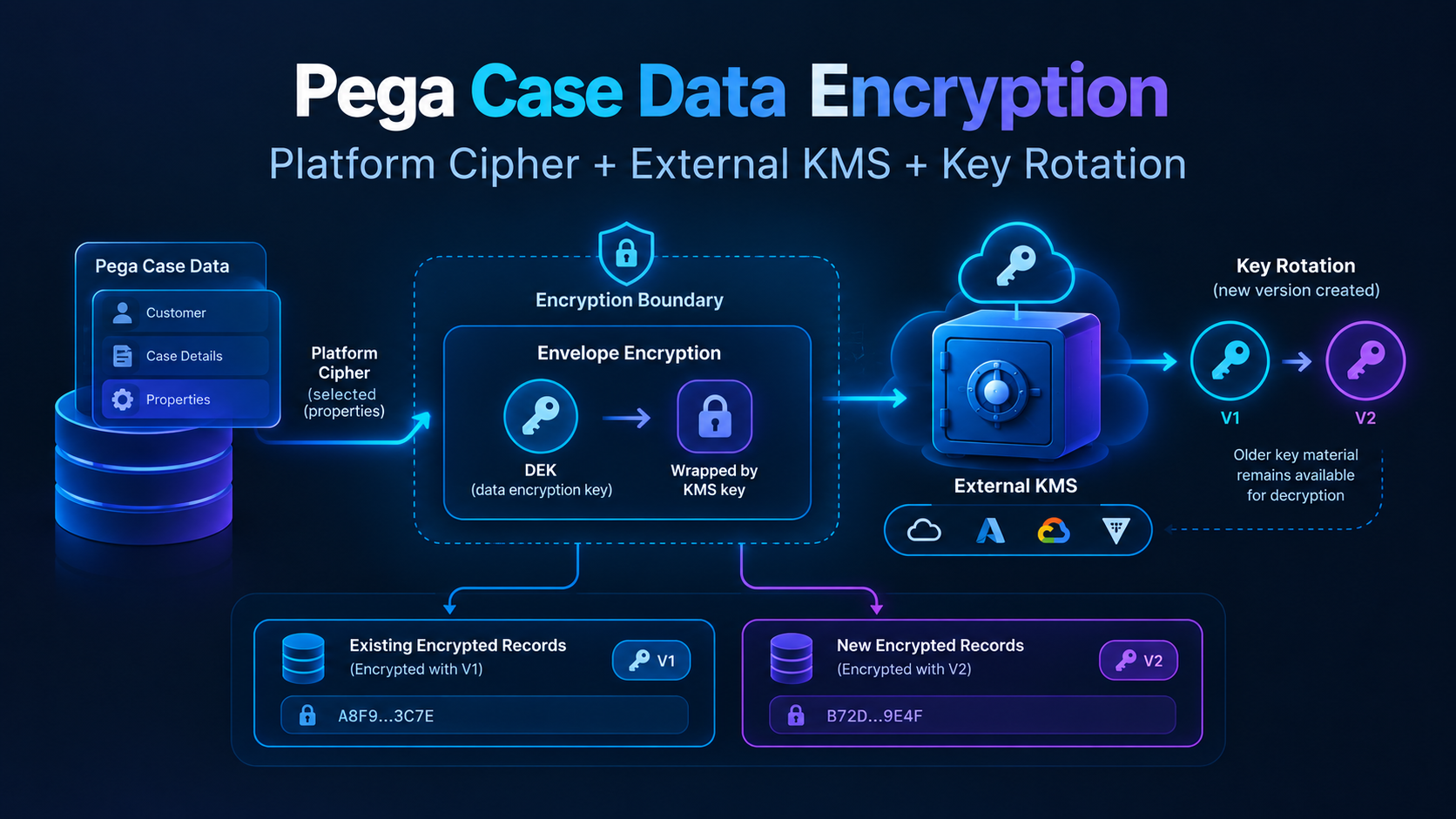
"We encrypt sensitive data at rest" is a sentence I've heard applied to Pega applications that encrypt nothing beyond whatever the database or disk layer already does by default — which protects you against a stolen hard drive and not much else. Pega's actual application-level encryption, Platform Cipher with properties marked for encryption, is a genuinely different and stronger guarantee. It's also narrower than people assume, and the gap between what it sounds like it covers and what it actually covers is where I've seen compliance conversations go sideways.
What gets encrypted, and how you mark it
Encryption in Pega is opt-in at the property level, not applied to the database wholesale. The current best-practice mechanism is a PropertyEncrypt access control policy (available from Pega Platform 7.4 onward, built on attribute-based access control, which is on by default from 8.2) — you create the policy and explicitly list which properties it covers. Once a property is in that list, Pega encrypts it automatically whenever a value is assigned and saved: in the database column, on the clipboard, in logs, and in search indexes. That multi-surface coverage is the actual value — it's not just "the column in the table is unreadable," it's that the value doesn't show up in plain text in a log file or a search index either, which is where a lot of accidental exposure actually happens in practice.
If you're working in an older application, you may still find the pre-7.4 approach — a TextEncrypted property type — doing the same job at the type level instead of via policy. It still works, but PropertyEncrypt is the supported direction, and it's worth migrating to rather than extending the older pattern into new development.
You can also encrypt an entire BLOB column rather than individual properties, which is a coarser but simpler option — the tradeoff is the usual one between granularity and performance: encrypting everything in the blob costs more at read/write time than encrypting the specific properties that actually need it.
What "encrypted" means underneath: Platform Cipher and your own KMS
The cipher itself is configured — which algorithm, and where the key comes from — via prconfig.xml or a Dynamic System Setting (security/cipher/default). The default platform cipher uses AES256-CBC with PKCS7 padding. Where this gets genuinely interesting for regulated environments is that you're not limited to a key Pega manages: Platform Cipher supports bring-your-own-key through an external key management service — AWS KMS, Azure Key Vault, Google Cloud KMS, and HashiCorp Vault are all supported — where you create a keystore that references the external KMS (via a data page) and use your own Customer Master Key rather than a platform-internal one. With AWS KMS specifically, that also gets you both time-based and on-demand key rotation, managed through the KMS rather than through Pega.
That matters for the conversation compliance teams actually want to have: "who controls the key" is frequently the real question behind "is this encrypted," because a key Pega holds on your behalf means Pega — or anyone who compromises Pega's key store — can decrypt your data. A key your own KMS holds, with your own access policies and audit trail on key usage, is a materially different answer.
How key rotation works: why a new key can still read old data
The obvious worry with rotation is that data encrypted yesterday with the old key becomes unreadable once a new key takes over. In practice it doesn't, because a rotated key does not replace the old one — the old key material is kept for decryption, and every piece of ciphertext carries a pointer to the key version that produced it. Two ideas make this work.
1. Keys have versions, and ciphertext remembers which one it used. A KMS key is really a key identity (the ARN, alias, or key name) with one or more versions of key material behind it. When something is encrypted, the output includes metadata naming the version used. On decrypt, the KMS reads that metadata and automatically picks the matching version. Rotation simply adds a new version and makes it the one used for new encryptions; older versions stay available to decrypt older ciphertext.
2. Envelope encryption keeps the big key small and the rotation cheap. Rather than encrypting every record directly with the master key, the common pattern is a two-layer design: data is encrypted with a data encryption key (DEK), and the DEK is itself encrypted ("wrapped") by the master key held in the KMS. The wrapped DEK is stored alongside the data. To read a record, the wrapped DEK is sent to the KMS, which unwraps it using whichever master key version wrapped it, and the DEK then decrypts the data. The master key never leaves the KMS, and the data itself is never re-encrypted just because the master key rotated.
Reading a record: the stored tag tells the KMS which master key version to use, so old data keeps decrypting after rotation.
Put together, a rotation looks like this:
- Day 1: master key version 1 wraps DEK-A. Records encrypted under DEK-A are stored with a pointer to "wrapped by v1."
- Rotation: the KMS creates version 2 and uses it for all new wrapping and encryption. Version 1 is retained, not deleted.
- Later: reading an old record sends its wrapped DEK to the KMS, which sees "v1," unwraps it with v1, and returns the DEK. New records are wrapped with v2. Both coexist indefinitely.
Rotation timeline: new data moves to v2 immediately, old data stays on v1 until it is re-encrypted.
The practical differences between providers are mostly in how automatic this is. With AWS KMS automatic rotation, the key ID and ARN stay the same while the backing key material changes, and old material is retained so existing ciphertext keeps decrypting with no application change. Azure Key Vault and similar services model it as key versions, with the version recorded against what was encrypted. A manual rotation — creating an entirely new key and pointing an alias at it — works the same way conceptually, but the old key must be kept alive and still reachable for as long as any data still depends on it.
Two caveats are worth being deliberate about:
- Rotation protects future data; it doesn't re-protect existing data. Existing records stay protected by the old key version until they are re-encrypted. If the goal is to retire an old key — because it may have been exposed, or policy requires it — the data has to be re-encrypted (or its DEKs re-wrapped under the new version) first, and only then can the old version be disabled. This is a separate migration step, not something rotation does on its own.
- Deleting or disabling an old key version destroys access to everything it protected. This is the one way rotation goes badly wrong: someone cleans up "unused" old keys and every record still depending on them becomes permanently unreadable. Old versions should be retired only after confirming nothing still references them, and ideally after a disable-and-monitor period before any deletion.
The exact mechanics of how Platform Cipher calls the external KMS (direct encrypt/decrypt calls versus wrapped DEKs) are worth confirming against the Pega documentation for the version in use, but the rotation behavior above is what the KMS side guarantees either way: versioned key material, retained old versions, and ciphertext that records which version it needs.
What this does not protect against
This is the part that gets skipped in the rush to say "yes, we encrypt that":
- Anything not explicitly listed in the encryption policy. Encryption is opt-in per property. A new property added to a case type later doesn't inherit encryption from a sibling property — it has to be added to the policy itself, which means a schema change is also a security-review item, not just a data-model item.
- Data visible to an authenticated user through the UI. Property encryption protects the value at rest and in transit through the data layer; it does nothing about who's allowed to see the decrypted value in a case view. That's an access-control and privilege question, answered by other rules entirely, not by the fact that the property happens to be encrypted at rest.
- Reportability and searchability trade-offs. An encrypted property generally can't be used the way an unencrypted one can in standard reporting or search the same way — which is exactly why "just encrypt everything" isn't the default recommendation; it's a deliberate choice per property, weighed against how that property needs to be used.
- Data that's left the property entirely. A value copied into a different, unencrypted property by a data transform, exported to a report, or sent to an integration that doesn't itself encrypt the payload is no longer covered by the fact that its source property was encrypted. Encryption travels with the property, not with the value once it's been copied elsewhere.
What I'd tell myself before starting
- Confirm which specific properties are actually in the PropertyEncrypt policy before describing an application as encrypting sensitive data — "we have encryption configured somewhere" and "this specific property is covered" are different claims.
- Use your own KMS if the compliance answer needs to be "we control the key," not just "the data is encrypted" — those are different guarantees to an auditor.
- Rotate keys freely, but retire them carefully. Rotation keeps old versions available so existing data still decrypts; only re-encrypt-then-disable removes an old key from the picture, and deleting one that data still depends on is unrecoverable.
- Treat adding a new sensitive property as a security-review step, not just a data-model change — it has to be added to the encryption policy explicitly, every time.
- Encryption at rest is not access control. Don't let a property being encrypted substitute for actually restricting who can view it decrypted in the UI.