I've been running databases in production since MySQL in the early 2000s — back when half the internet, mine included, lived on some shared hosting box running the LAMP stack, right next door to a few million GeoCities pages with animated "under construction" GIFs. MySQL wasn't so much a choice back then as the only thing your $5-a-month host gave you, and it stuck with me for years purely out of habit after that. Over the years that's loosened up: SQLite for smaller tools and anything that didn't justify running a full server, MongoDB for a stretch when a project's data genuinely wanted to be schema-flexible. Postgres's jsonb support has quietly eaten most of that original reason to reach for Mongo — it's indexable, queryable, and sits right next to the rest of my relational data instead of in a separate store. And with RAG-style workloads becoming a normal part of what I build, pgvector means embeddings can live in the same database too, instead of standing up a dedicated vector store alongside everything else. Between those two, the direction of travel for the last few years has been steadily toward Postgres, and it's gotten easier with each one — every feature that used to mean reaching for a separate database is one less reason to keep MySQL or Mongo around. Every new project starts on Postgres now, and I've been migrating the older ones across one at a time, with the end goal of retiring the last MySQL server entirely and consolidating everything onto Postgres.
This particular database started life on Neon. It was great while the app was small — serverless Postgres, zero ops, generous free tier. Then the app grew into a real multi-tenant SaaS product with a lot of write traffic, and the Neon bill grew with it. At some point self-hosting Postgres on my own Proxmox hardware stopped being a "someday" idea and became the obvious next step.
The catch: the moment you self-host, you lose the managed backup/PITR story that comes free with a provider like Neon. You become responsible for it. This post is the architecture I ended up with — real-time streaming replication plus pgBackRest-driven backups — and the reasoning behind every piece of it, including the two designs I tried and threw away first.
Why not just pg_dump?
pg_dump (or pg_dumpall) is the obvious first answer, and it's what I used for a long time on smaller databases. The problem is that it's logical and always full-size: every run reads and dumps the entire database from scratch. As the dataset grows that means a slower dump, more I/O load on the primary while it runs, and backups that only ever let you restore to "whenever the last dump finished" — not to any specific second.
pgBackRest is a different tool entirely. It's physical and block-level: one full backup, then differential/incremental backups that only capture the blocks that actually changed, plus continuous WAL archiving in between. That combination gives you point-in-time recovery — restore to any second, not just "last night" — for a fraction of the I/O a full logical dump costs.
The architecture
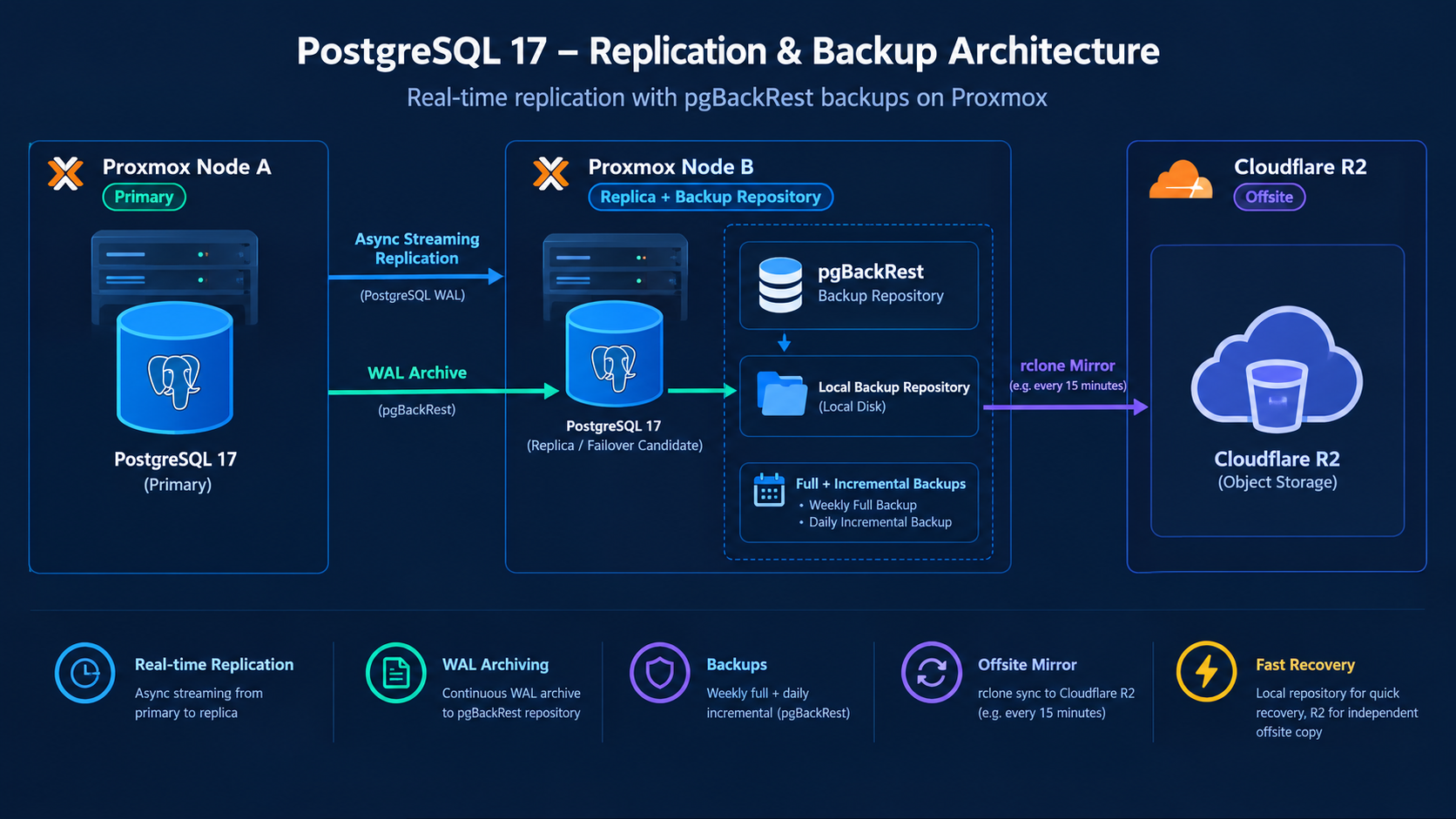
The design uses two physical nodes and one offsite copy, each doing one job:
| Node | Role | Notes |
|---|---|---|
| Node A | Primary Postgres | Production, otherwise unchanged. Ships WAL to Node B via archive_command over SSH. |
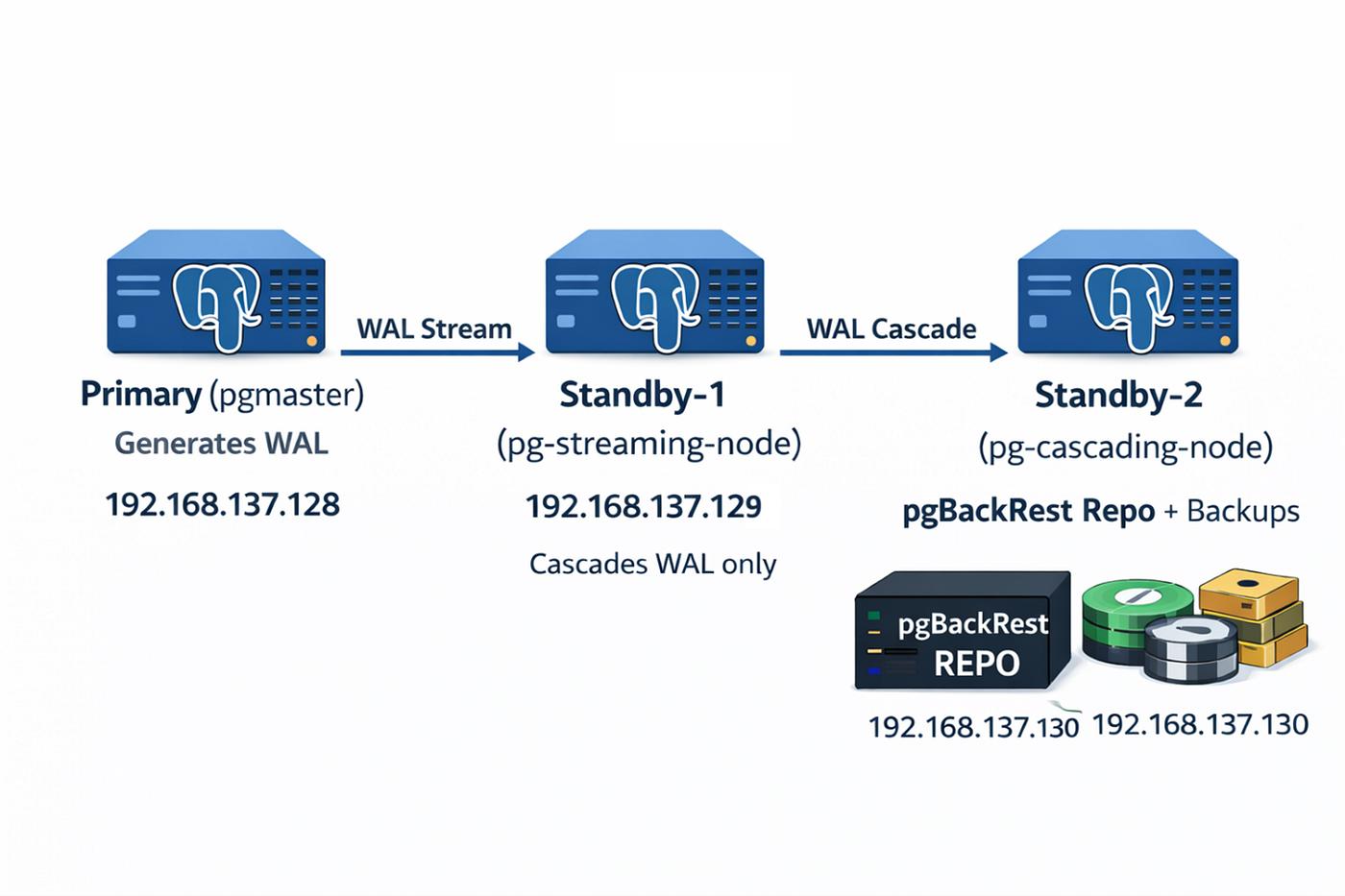
| Node B (separate physical host) | Async streaming replica + pgBackRest repo host | Also runs pgBackRest and holds the backup repo on local disk — backups and WAL land here at LAN speed, so there's zero extra load and no internet dependency on the primary's critical path. Doubles as a failover candidate. |
| Cloudflare R2 | Async offsite mirror | S3-compatible, already in use for other storage, no egress fees. Not a pgBackRest-managed repo in the usual sense — a separate scheduled job mirrors Node B's repo up to R2, fully decoupled from backup/archive timing. |
The important design decision here is local-first, with R2 as an async mirror — and I only got there after trying two other layouts first.
What I tried before this
My first draft pushed backups and WAL straight to R2 as the only repo. It technically works, but every backup and every WAL segment now depends on internet latency to Cloudflare — on a home/office internet connection, that's a real tax on the primary's write path, and it makes restores slow exactly when you need them fast.
My second draft added a dedicated Raspberry Pi as a repo host, sitting between the primary and R2. That solved the latency problem but added a single low-power device as a new dependency, plus another thing to patch, monitor, and eventually replace.
What I landed on instead: Node B — a real server I already needed as a replica — just also holds the authoritative pgBackRest repo on local disk, and R2 only ever receives a periodic, decoupled mirror of it. A few consequences worth knowing if you copy this:
- Backups and WAL archiving never block on internet/R2 latency — they only need Node A ↔ Node B over LAN, which is also what makes restores fast.
- The R2 mirror lags behind by up to the sync interval (15 minutes, in my case) — that's the real RPO for the offsite copy specifically. The local copy on Node B still has near-zero RPO thanks to continuous WAL archiving.
- Node B is now a single point of failure for anything not yet mirrored — if its disk dies before a sync catches up, that window's backups are gone with it. The mirror job needs real monitoring, not just a cron entry you forget about.
Setting it up
I'm using Postgres 17 and Debian 12 LXCs throughout — adjust versions and paths to match yours. Before touching any config, back up the primary the boring way first: a Proxmox LXC snapshot for a fast rollback, and a plain pg_dump copied off-box. There's no pgBackRest safety net yet at this point, and the next step requires a restart, not just a reload.
1. Provision the replica
Node B needs to be sized for a backup repo, not just a thin replica — budget several times the primary's database size, on its own mount rather than the rootfs, so a full repo disk doesn't take the replica down with it.
apt update && apt install -y sudo postgresql-common openssh-server
/usr/share/postgresql-common/pgdg/apt.postgresql.org.sh -y
apt update && apt install -y postgresql-17
mkdir -p /data/pgbackrest && chown postgres:postgres /data/pgbackrest
Debian's own repo only ships one PostgreSQL major version per release, tied to the OS codename — the official PGDG apt repo above is what lets you pin a specific major version instead.
2. Turn on streaming replication
On the primary, wal_level has to change from its default, which requires a full restart:
wal_level = replica       # mandatory, requires a restart
listen_addresses = '*'    # check it's not already set before changing it
Create a replication role and scope access to the replica's IP specifically — not its subnet:
sudo -u postgres psql -c "CREATE ROLE replicator WITH REPLICATION LOGIN PASSWORD '<STRONG_PASSWORD>';"
echo "host replication replicator <REPLICA_IP>/32 scram-sha-256" | sudo tee -a /etc/postgresql/17/main/pg_hba.conf
Restart, then clone the primary onto the replica with pg_basebackup:
sudo systemctl stop postgresql@17-main
sudo -u postgres bash -c 'rm -rf /var/lib/postgresql/17/main/*'
sudo -u postgres pg_basebackup \
  -h <PRIMARY_IP> -U replicator -D /var/lib/postgresql/17/main \
  -P -R -C -S backoffice_replica --wal-method=stream

sudo systemctl start postgresql@17-main
Confirm it actually came up as a replica, not a second primary:
sudo -u postgres psql -c "SELECT pg_is_in_recovery();"
# expect: t

# from the primary:
sudo -u postgres psql -c "SELECT client_addr, state, sync_state FROM pg_stat_replication;"
# expect one row, state = streaming, sync_state = async
Async rather than sync replication was a deliberate choice — sync replication means every commit on the primary waits for the replica to confirm, which adds latency to every write. For a backup/failover replica (as opposed to a replica you're relying on for read-scaling correctness), that tradeoff isn't worth it.
3. Install pgBackRest and set up SSH trust both ways
pgBackRest needs to be installed on both nodes — the primary runs archive-push, the replica actually drives backups. SSH trust needs to go in both directions: the replica needs passwordless SSH into the primary to run backups against it, and the primary needs passwordless SSH into the replica to push WAL and backup data into its repo.
# both nodes
apt install -y pgbackrest
mkdir -p /etc/pgbackrest /var/log/pgbackrest
chown postgres:postgres /var/log/pgbackrest /etc/pgbackrest
One gotcha here: the postgres system user normally has no password, which ssh-copy-id needs to copy a key over. Either set one temporarily and lock it again afterwards, or just append the public key to the target's authorized_keys manually over an existing root session.
4. Configure pgBackRest — asymmetric on purpose
Unlike the R2-only draft I abandoned, the config is not identical on both hosts. Each host's [global] section describes the repo relative to itself: the primary reaches it over SSH, the replica (the repo host) just uses the path directly. R2 doesn't appear in this file at all — that's handled separately.
# On the primary
[global]
repo1-type=posix
repo1-host=<REPLICA_IP>
repo1-host-user=postgres
repo1-path=/data/pgbackrest
repo1-retention-full=4
repo1-retention-full-type=time

[mydb]
pg1-path=/var/lib/postgresql/17/main
# On the replica
[global]
repo1-type=posix
repo1-path=/data/pgbackrest
repo1-retention-full=4
repo1-retention-full-type=time
[mydb]
pg1-path=/var/lib/postgresql/17/main
pg1-host=<PRIMARY_IP>
pg1-host-user=postgres
pg2-path=/var/lib/postgresql/17/main
backup-standby=yThen, on the replica (the repo host), create the stanza — it has to succeed before archiving or backups will work at all:
sudo -u postgres pgbackrest --stanza=mydb stanza-createOrder matters from here: turn on WAL archiving after the config and stanza exist, not before — otherwise every WAL switch fails to archive until you catch up.
# postgresql.conf, on the primary
archive_mode = on
archive_command = 'pgbackrest --stanza=mydb archive-push %p'
archive_timeout = 60
Restart (reload isn't enough for archive_mode), then verify archiving end-to-end — check forces a WAL switch and confirms it actually lands in the repo, which is a real test of SSH trust, config, and the stanza all at once:
sudo -u postgres pgbackrest --stanza=mydb check
sudo -u postgres pgbackrest --stanza=mydb --type=full backup
5. Automate it
# crontab -u postgres -e, on the replica
0 2 * * 0 pgbackrest --stanza=mydb --type=full backup
0 2 * * 1-6 pgbackrest --stanza=mydb --type=incr backup
pgBackRest auto-prunes expired fulls per the retention setting, keeping the dependent incrementals and WAL alongside each — in my case that's roughly a 2–4 week point-in-time recovery window against the local repo.
6. Mirror the repo to R2
This is the piece that turns the local repo into an actual offsite backup, without it ever sitting on Postgres's critical path. rclone has a native S3-compatible backend for R2:
*/15 * * * * rclone sync /data/pgbackrest r2:mydb-pgbackrest/mydb --delete-during --log-file=/var/log/pgbackrest/rclone-sync.log--delete-during keeps R2 matching the local repo exactly, including anything pgBackRest has already pruned — so R2 never grows into an independently-retained copy with its own cleanup problem. Because it's a faithful mirror of a real pgBackRest repo rather than a separate managed repo2, restoring from it later is just a matter of pointing a fresh pgbackrest.conf at the same bucket with repo1-type=s3 — the restore commands themselves don't change.
The step people skip: actually testing a restore
A backup job reporting success is not proof that recovery works. I periodically spin up a throwaway container with the same Postgres major version and an empty data directory, and restore into it from both sources — the local repo on the replica, and the R2 mirror — since they're reached completely differently and a bug in one path won't show up in the other.
# restore the latest backup from the local repo
sudo -u postgres pgbackrest --stanza=mydb --repo=1 restore

# or restore to a specific point in time
sudo -u postgres pgbackrest --stanza=mydb --repo=1 \
  --type=time --target="2026-09-20 03:00:00" --target-action=promote restore
Restoring from the R2 mirror uses the same command against a throwaway config pointed at the bucket instead of the local path. If you've never run this drill, you don't actually have backups — you have a cron job you're hoping works.
Monitoring
pgbackrest --stanza=mydb info    # backup history, sizes, repo status
pgbackrest --stanza=mydb check   # verifies WAL archiving + repo connectivity
tail -20 /var/log/pgbackrest/rclone-sync.log   # confirms the R2 mirror is actually running
That last one matters more than it sounds like it should — pgBackRest has no visibility at all into whether the rclone mirror job is still alive, so it's the one piece of this setup that needs its own explicit check rather than relying on pgBackRest's own reporting.
What I'd tell myself before starting
- Confirm your Postgres major version matches exactly between primary and replica before you start — mismatched minor versions are fine, mismatched major versions break streaming replication outright.
- Size the replica for a backup repo, not just a replica. I underestimated this at first — it's holding the live data directory and weeks of fulls, incrementals, and WAL.
systemctl stop/start/restart postgresqlwithout a version suffix only works once a cluster is registered. On a fresh container, or before that registration happens, target the instance directly (postgresql@17-main) instead.- Validate config changes before restarting, not after. A one-line typo in
postgresql.confturns a planned maintenance window into an outage if you only find out from a failed restart. - Do the restore drill before you trust any of this. It's the only step on this list that actually proves the rest of it works.
None of this is exotic — it's the same architecture most production Postgres setups eventually land on. What made it worth writing up is how much of it is small, easy-to-miss ordering and configuration details (SSH trust in both directions, asymmetric configs, archiving before the stanza exists, repo sizing) that aren't obvious until you hit them the first time.